Example · Spreadsheet to PDF
One soffice command, two IRRs: 44,884.78% or NM
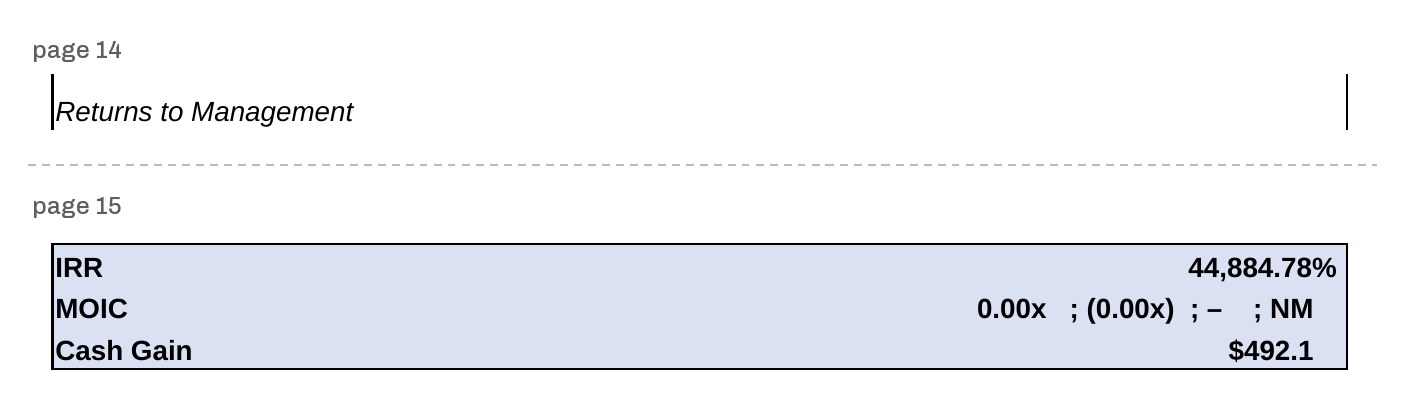
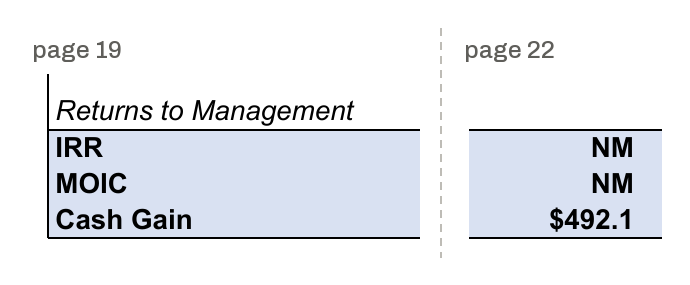
Convert a public financial model to PDF with headless LibreOffice and you get a management IRR of 44,884.78%. The Microsoft Excel value for the same cell is NM. Run the identical command with Wolf installed as soffice and you get NM.
Management IRR, cell RETURNS!I44
soffice = LibreOffice 26.8.0.3
44,884.78%
soffice = Wolf 0.2.17
NM
Extracted text for a downstream pipeline
Teams that index spreadsheets for search or an AI model often convert XLSX to PDF with soffice and then extract the text. These are the management rows of each PDF, extracted with pdftotext -layout.1
# page 14
Returns to Management
# page 15
IRR    44,884.78%
MOIC    0.00x ; (0.00x) ; – ; NM
Cash Gain    $492.1
# page 19
Returns to Management
IRR
MOIC
Cash Gain
# page 22
    NM
    NM
    $492.1
The four formula cells under the management and revolver returns, located in each PDF:3
| Cell | Microsoft Excel | LibreOffice 26.8.0.3 PDF | Wolf 0.2.17 PDF |
|---|---|---|---|
| RETURNS!I44Management IRR | NM | 44,884.78% (page 15) | NM (page 22) |
| RETURNS!I45Management MOIC | NM | 0.00x ; (0.00x) ; – ; NM (page 15) | NM (page 22) |
| RETURNS!I125Revolver IRR | NM | ### (page 16) | NM (page 24) |
| RETURNS!I126Revolver MOIC | NM | 0.00x ; (0.00x) ; – ; NM (page 16) | NM (page 24) |
Why the values differ
The workbook holds 2,380 formulas, and 2,380 of them have no cached value. Every formula has to be calculated by the converter before the sheet can be printed. The render report from the Wolf run includes that warning: 2380 formula cell(s) had no cached value LibreOffice would use and were calculated on load; the other formula cells keep their cached values
.
Cell I44 is =IFERROR(XIRR(I40:N40,I30:N30),"NM"). In the recalculated copies from both engines, its cash flows in I40:N40 are 0, 0, 0, 0, 0 and 492.1, dated December 31 of each year from 2024 to 2029. With no negative cash flow, there is no rate at which their net present value is zero, so the IRR is undefined.4
- Microsoft Excel: the cell value is NM. XIRR has no result for these flows, so the IFERROR fallback is used.
- LibreOffice: the cell value is 448.847829244812, formatted in the PDF as 44,884.78%.
- Wolf: the cell value is NM, the same as Excel.
The revolver IRR in I125 has the same shape: cash flows of 0, 1.25, 1.25, 1.25, 1.25, 1.25, none negative. Its LibreOffice value is 41072487891.0192, too wide for its column, so the PDF cell holds ###. The MOIC cells I45 and I126 are NM in both engines; in the LibreOffice PDF their text is the number format pattern itself, 0.00x ; (0.00x) ; – ; NM.
If you shell out to soffice to turn spreadsheets into PDF or text for search, retrieval, or an AI model, 44,884.78% is the management IRR you index from this file.
Reproduce it
You need LibreOffice, poppler's pdftotext, and the wolf binary from Wolf Runtime. Each binary is linked as soffice in its own directory, and PATH is the only difference between the two runs.5
# SOFFICE_BIN: your LibreOffice soffice. WOLF_BIN: the wolf binary.
curl -LO https://github.com/user-attachments/files/20989007/Project.Mosaic.2025-6-26.xlsx
shasum -a 256 Project.Mosaic.2025-6-26.xlsx   # e46fd7ed99b6aee1ecd04d2781a7f036e35c7f9f117b169aaf0ce16652c46c87
mkdir bin-libreoffice bin-wolf
ln -s "$SOFFICE_BIN" bin-libreoffice/soffice
ln -s "$WOLF_BIN" bin-wolf/soffice
for arm in libreoffice wolf; do
  rm -rf profile out
  env PATH="$PWD/bin-$arm:/usr/bin:/bin" soffice -env:UserInstallation="file://$PWD/profile" \
    --headless --invisible --convert-to pdf --outdir out Project.Mosaic.2025-6-26.xlsx
  pdftotext -layout out/Project.Mosaic.2025-6-26.pdf "$arm.txt"
done
grep -c '44,884.78%' libreoffice.txt wolf.txt
Expect a count of 1 for libreoffice.txt and 0 for wolf.txt.
Where to go next
Try Wolf on your own workbooks with Wolf Runtime, or read how a headless LibreOffice step can be replaced.